Team Fortress 2

CGSociety has an interesting feature about Team Fortress 2.

The art in TF2 and the game in general is indeed quite special imo 🙂 Having played it for a few hours, I really can appreciate the game Valve put together. High usability, restricted weapon selection and funny cartoonish graphics and animations trick the player into believing that this really is an easy kids game, but nothing is less true. Well.. it actually all depends on the players 🙂

A lot of rookie players (I have the impression there are a lot, me included 😉 ) just don’t get the full potential of the game and do a brute force attack. But due to unique gameplay elements, you are forced to find better or switch tactics all the time. For example, you simply can not find a sniping spot and snipe until you are discovered, simply because after each kill, the killee (heheh =) ), is presented a nice close up snapshot of his killer!
On top of that, because the game keeps track of your kills and hangs a big fat nemesis icon above your head for the people you killed a lot, you can be reassured to spend some payback time. 😉

There does not exist such thing as a fail proof tactic, each can be countered. And this is not because of the right weapon choice, but because of the wide range of characters. It takes some time to handle each of them in an effecient way and unless in each class someone knows what he does, the team simply doesn’t work. And that’s in fact my only problem with the game, I guess. 🙂 A lot of people don’t play their class well and also don’t care “because they just wanna frag”. That’s okay, if the other team agrees with that 😉 The minute they start playing “intelligently”, they win. Of course, the game wouldn’t be called team fortress if team play wasn’t a key part of the game 😉 yet, on public servers, we all know it is sometimes hard to find the team spirit …
Lirc on openSUSE 10.3

I somehow always procrastinated the installation of my Hauppauge WinTV PVR 150 IR remote because it somehow didn’t work out of the box, but today I took another shot at it and was surprised how easy it all turned out to be!

The first thing you need to realize, is that you need to install a kernel module: lirc_i2c. Unfortunately, due to a string length being shortened in recent kernel, the suse provided kernel module does not work! Instead, grab a freshly compiled one from here. After having this installed, you should already have a working remote! (you might want to tweak your /etc/sysconfig/lirc : choose the hauppauge driver and the lirc_i2c module, but the defaults seemed to work too). You can test your remote by doing a cat /dev/lirc and pressing some remote buttons.

Easy, no? 🙂 The rest is application specific configuration 😉 Be sure to have a look at KDE’s infra-red app, IRKick, which does a great job at binding through DCOP!

One thing to note though, is that the default lirc config is supposed to create a device /dev/lircd from /dev/lirc when starting lircd, but in my case, it wouldn’t do that until I specifically told it to create that one through the –output param (only had to do this once).

I was greatly helped by the following sources: mythtv 1, 2

google video resume bug?

one of the features I like about google video is that you can click in the middle of the progress bar and it will start playing the vid from there without having to buffer all the previous. I use this feature when watching long presentation (or some keynote 😉 watch this if you still haven’t!) and I don’t have time to watch through in one go, I can return later and resume where I left off. Unfortunately, this doesn’t work anymore??! I used it yesterday, and today, no go! Is this a bug? Are you experiencing it too? Am I going crazy? 😉

Also, it seems the download feature has been removed…

Redirecting error output on windows console

I thought I already blogged this, but I can’t find it back, so let me try one more try as I seem to need this from time to time and then fail to remember the correct syntax! 🙂

The scenario is: you have this huge error output on your console (for example a very long compiler error). Since it is quite long, console history is not big enough to see the beginning. You could of course increase the history size, but it’s not a real solution. Everyone knows how to redirect console output to a file, simply like this:

type myhugefile.txt > output.txt

This is all nice and dandy, except, it doesn’t capture the error output (stderr) (which is exactly what we’re interested in ;)). You have to do some win32 console-fu as follows:

mingw32-make 1> output.txt 2>&1

This tells the shell to redirect standard output (stdout) to output.txt and redirect error output to standard output.

You can read all this information in a nice collegebook format on MS’s KB.

Half-life 2. Finally.

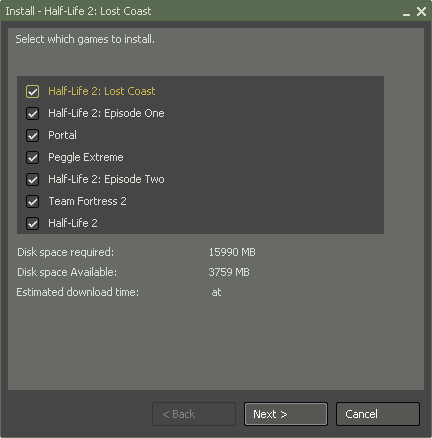
yes, I know my hardware is not the most recent, but so is Half-life 2. Yet, it seems I won’t manage to play it although I finally bought it! 🙂 Have a look at the following nice free disk space requirements..:
Orange box disk space requirements
/me faints 😉

even when I only want to install Portal (which I wanted to try out badly), I still need 6260 MB !!?? what have they done with that game?! it looked so nice and small (and I heard play time was not that much either ;))

Guess I’ll do have to buy that extra disk first now!

Btw, I bought it through steam, but got almost zero price benefit (given that the dollar is quite weak now) over a boxed version here in Belgium. Still, I wanted to try it and I wanted to play _now_ 😉 (I guess, after hours of downloading ;))